
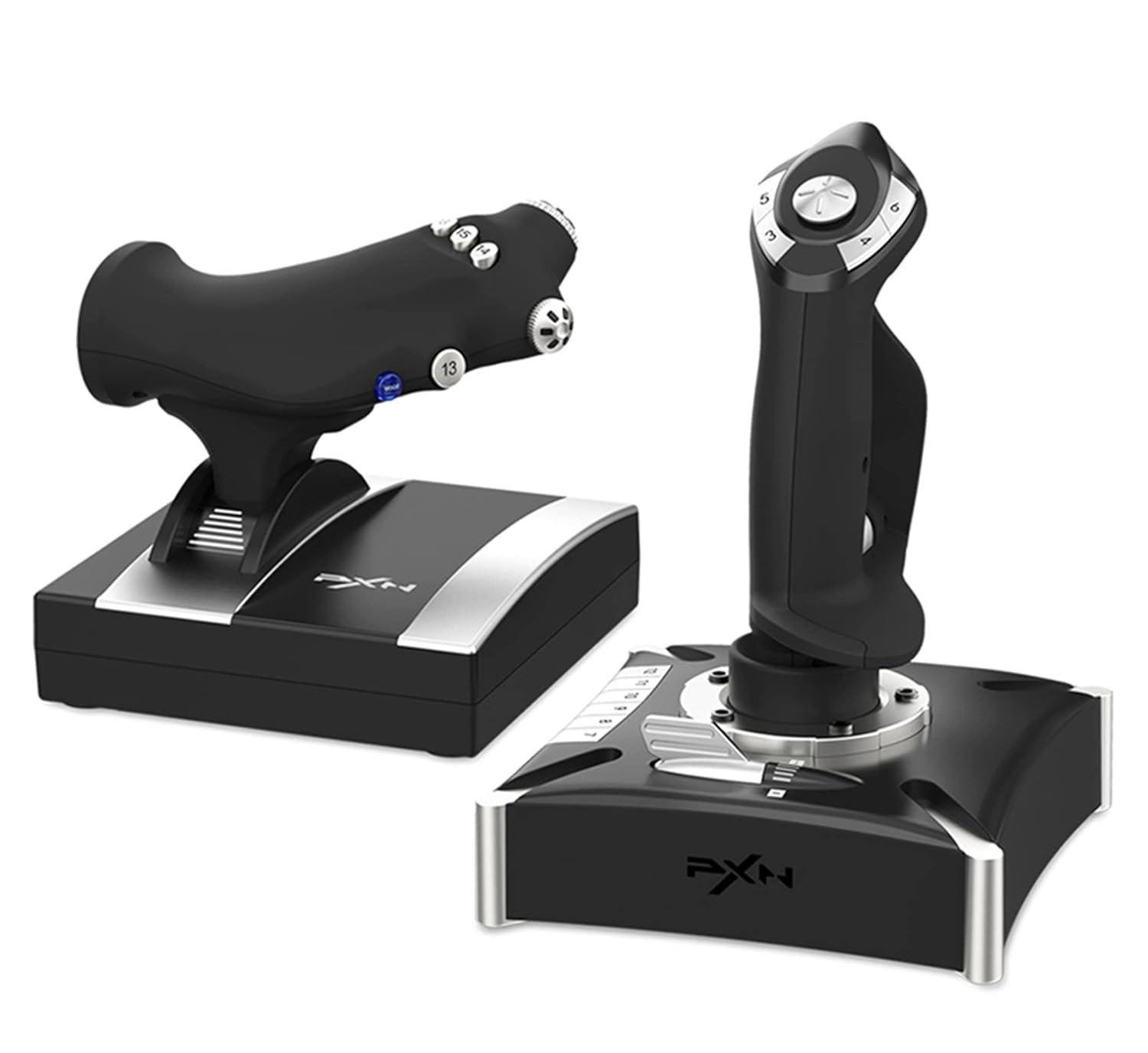
PXN-2119Pro Flight simulator controls Flight Stick with Vibration for pc Windows 7/8/10(Not Support Mac Systems PS3/ PS5/xp/vista)
$109.99
Related Products


Product description

1 .You can play the game directly without installing a driver,Some games are plug-and-play, while others require settings (which need to be configured within the game itself). If you need a driver and keyboard mapping function, you need to install a joystick driver.

1. Please log in to the official website click on the homepage/——Support——Tools——PXN Flight Joysitck Driver/mapping software 3.0 to download the software to customize the button settings, or in You can find the download link in the installation part of the manual,


Product Model: PXN-2119 PRo Dimensions: Joystick 176x176x239mm, Throttle 170x170x159mm Cable Length: Main Joystick Cable approx. 1800mm, Throttle Cable approx. 1600mm Supported Platform: PC System Support: Windows 7, 8, 10
1. 【Realistic Dual‑Vibration & Immersive Simulation】:Built‑in dual vibration motors deliver authentic airflow, turbulence, and engine feedback for lifelike flight immersion. The separate throttle unit with damping feel lets you precisely control engine power, matching real‑aircraft operation for Microsoft Flight Simulator, War Thunder, and more.
2.【Wide Multi‑Platform Compatibility】:Wired USB connection works with PC (Windows XP/7/8/10), Compatible with most top flight simulators including X‑Plane, Air Combat, World of Warplanes, and Lock On: Flaming Cliffs 3. Plug‑and‑play ready with simple driver setup for full features.
3.【Full Customization & Programmable Controls】:16 fully programmable function keys + 8‑way POV hat switch + rapid‑fire trigger support key mapping via driver software. Three mode expansion and 4‑axis precision let you tailor every control to your playstyle, ideal for casual pilots and simulation enthusiasts alike.
4.【Ergonomic & Stable Design for Long Sessions】:Ergonomic grip with intuitive button layout reduces hand fatigue during extended flights. Heavy‑duty base with strong suction cups locks firmly to desks, eliminating sliding for steady, accurate maneuvers. Joystick unit can be used independently for flexible setup.
5.【PRECAUTIONS】:After connecting the computer USB, if the computer cannot recognize the PXN-2119 Pro, please download the PXN-2119 Pro driver. If the connection is successful but the buttons do not work, you need to enter the game settings page in the game and select the joystick mode. For the settings of “Microsoft Flight Simulator 2020”, you can view the detailed setting steps in E-PXN Official Website – Service – Joystick Game button settings X-Plane 11.
6. 【PC Connection Method】Step 1 Launch PXN official website (e-pxn.com.cn) to download and install driver,details show below:Home–support–tools–find PXN joysitck software to download .step 2 Extract the downloaded driver,and install according to instruction.step 3 plug the PXN Flight joystick into pc usb port,computer will prompt new hardware and install automatically. step 4 then you can play game or Key mapping conduct joystick settings in PXN Joystick,Some games require you to go into the game settings.
9 reviews for PXN-2119Pro Flight simulator controls Flight Stick with Vibration for pc Windows 7/8/10(Not Support Mac Systems PS3/ PS5/xp/vista)
Add a review
$109.99
N.M –
Andy fernandez –
CWinay –
Christophe –
John Hart –
santiago macias ortega –
Jeffery R. –
Andre Singleton –
محمد –