
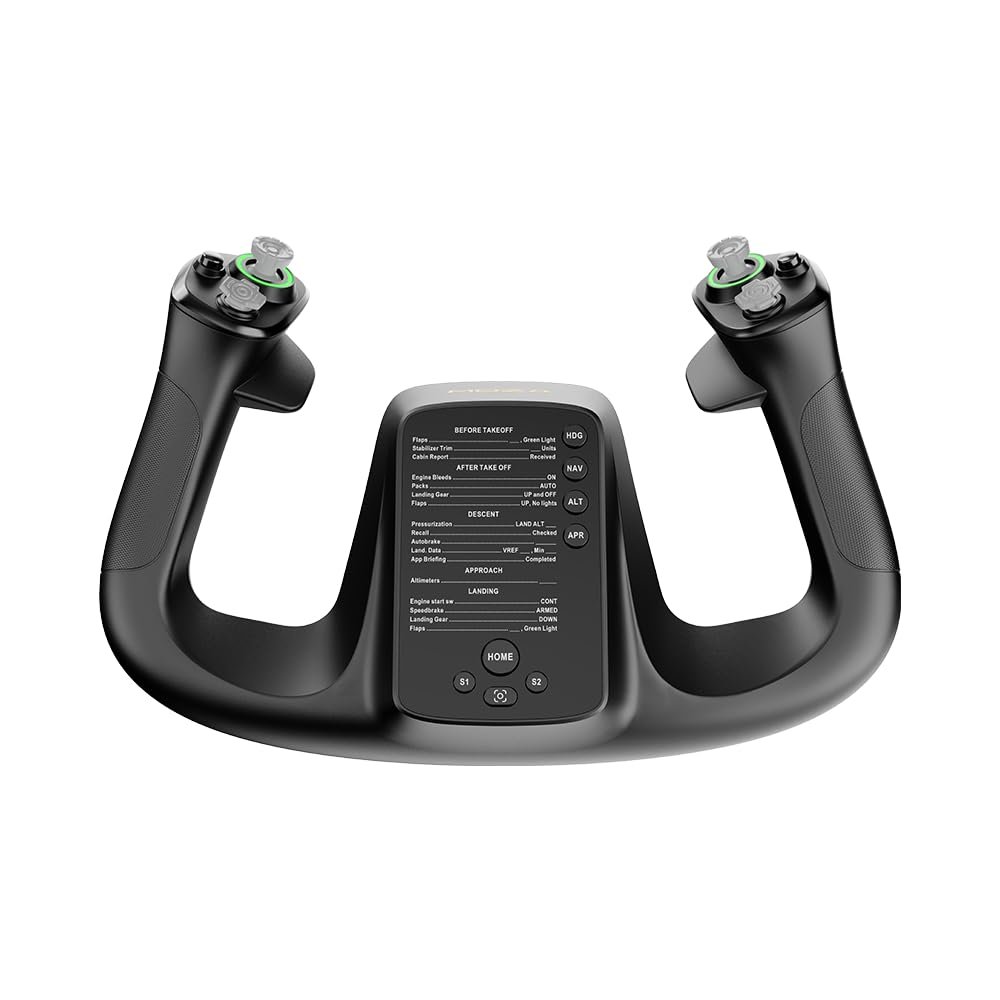
MOZA Flight Controls MFY YOKE, Flight Simulator Flightstick w/ 180° Rotation, 34 Configurable Inputs for PC, black
$174.00
Related Products
![Meta Quest 3 512GB + Meta Quest Digital Currency $25 [Digital Code]](https://thehometech-hub.com/wp-content/uploads/2026/06/31CvooZpnL.jpg)


Product description
At a Glance 
Designed for Precision. Built for Immersion.
The MOZA MFY Yoke delivers 34 configurable inputs, customizable RGB lighting, and dual Hall-effect joysticks—crafted with high-strength materials and a quick-release design for unmatched realism and control in every flight.
 Authentic Design, Professional Simulation
Ergonomically modeled after real commercial aircraft yokes, delivering a comfortable grip and highly immersive flight control experience.
 High-Strength Composite Construction
Built with fiberglass-reinforced PA66, the MFY Yoke withstands up to 30kg of force, ensuring long-term stability and performance.
 Up to 34 Configurable Inputs
Supports up to 34 inputs including axis-to-button mapping. Easily switch modes via onboard shortcuts or MOZA Cockpit software.
 Customizable RGB Lighting
Set your desired cockpit atmosphere with adjustable RGB effects. Choose from multiple modes for enhanced immersion.
 Aluminum Alloy Quick Release
Inspired by race car systems, the all-metal quick release allows fast, tool-free yoke swapping within seconds.
 Multi-Functional Customizable Triggers
Configure dual triggers as axis or button input. Ideal for elevator trim, rudder, autopilot disengage, camera control, or PTT.
 Hall Effect Joystick with Axis/Signal Modes
Drift-free, contactless Hall-effect joysticks provide precise input. Fully mappable in MOZA Cockpit for added control flexibility.
 Magnetic DIY Panels
Easily customize your yoke’s appearance with swappable magnetic front panels and printable templates.
Spec
Dimensions 142.5 × 202 × 313 mm Case Material Composite material Quick Release Material Aluminum alloy Button Cap Material ABS plastic Weight 1.3 kg 8-Way Switches 2 Hall Effect Joysticks 2 LB/RB Buttons 2 Triggers 2 Total Signal Outputs Supports up to 34
Which flight simulation games does the MFY Yoke support?
When connected to the MOZA AY210 Yoke Base, the MFY Yoke is compatible with leading flight simulation titles, including Microsoft Flight Simulator 2020/2024, X-Plane 11/12, DCS World, IL-2, War Thunder, and more.
How does the MFY Yoke attach to the yoke base?
It uses an all-aluminum quick-release mechanism. Simply push and rotate to securely attach it to the MOZA AY210 Yoke Base—no tools required.
Can the RGB lighting be customized or turned off?
Yes. Through the MOZA Cockpit software, users can fully customize lighting modes, colors, brightness, or choose to disable lighting completely.
What kinds of inputs does the MFY Yoke support?
The MFY Yoke offers up to 34 configurable inputs, including buttons, triggers, hat switches, and dual joysticks. Inputs can be mapped as axes or button functions using MOZA Cockpit software.
Can I use the MFY Yoke without the AY210 Base?
No. The MFY Yoke is designed to work exclusively with the MOZA AY210 Yoke Base for full functionality and feedback support.
PA66 composite materials for maximum durability
Aluminum alloy quick-release and ergonomic build for optimal comfort
34 configurable inputs with customizable RGB lighting for a fully personalized experience
Drift-free control for precision and accuracy
Supports a range of flight functions, including elevator trim, autopilot, and rudder control
Weighs just 1.3 kg for ease of use without compromising on durability
3 reviews for MOZA Flight Controls MFY YOKE, Flight Simulator Flightstick w/ 180° Rotation, 34 Configurable Inputs for PC, black
Add a review
$174.00
elvin avila –
John Mieras –
Bunker –