

Price: $35.59
(as of Jun 17, 2026 23:07:28 UTC – Details)
Product description
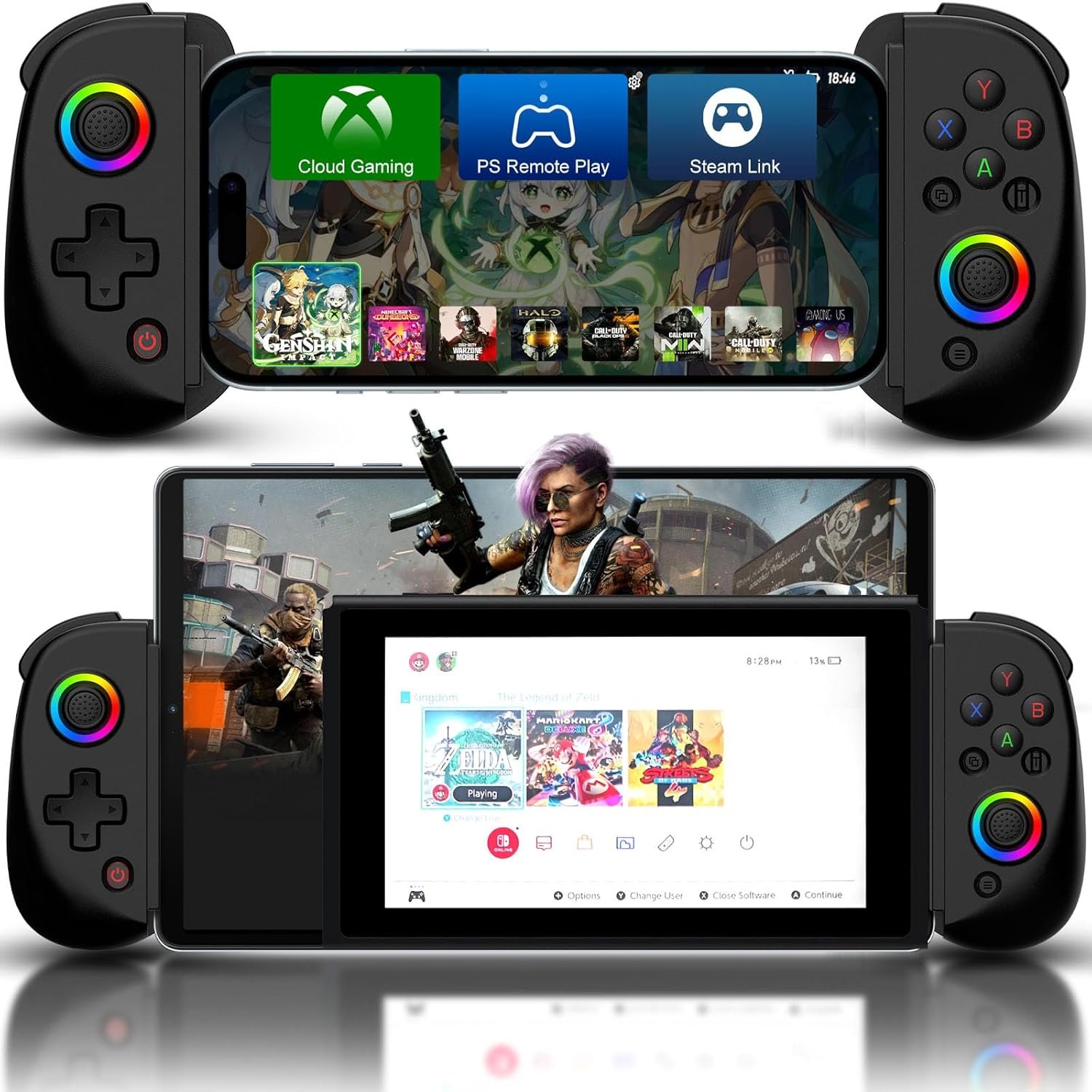
Wireless Controller Joystick for iPad/iPhone/Android with Phone Case Support
The video showcases the product in use.The video guides you through product setup.The video compares multiple products.The video shows the product being unpacked. ipad game cobtroller


 Size
Size
 Package
 Non-Slip Design
 FAQ
FAQ
Mobile Game Controller for iOS/Android/PC/Switch/PS4/Stream Connection Guide
The video showcases the product in use.The video guides you through product setup.The video compares multiple products.The video shows the product being unpacked. controller for ipad
Controller for iPhone, iPad, Mac, PC How to use mobile controller on iOS, PC
Make sure the controller is off, hold down the ‘RB’ key, then press the ‘HOME’ key to boot the controller.Turn on the Bluetooth connection ‘Xbox Wireless Controller’ on your iOS device.Start Playing.
After connection, you also can play cloud games via cloud gaming apps such as Xbox Cloud.
The video showcases the product in use.The video guides you through product setup.The video compares multiple products.The video shows the product being unpacked. controller for android
Controller for Android Phone/Tablet – Direct Play How to use phone controller on Android (2 Modes)
Make sure the controller is off, hold down the ‘RB’ key, then press the ‘HOME’ key to boot the controller. Turn on the Bluetooth connection ‘Xbox Wireless Controller’ on your Android device.
For different games, Android has a second controller boot mode: Hold down the ‘X’ key, then press the ‘HOME’ key to boot the controller. Turn on the Bluetooth connection ‘BSP-D8’ on your Android device.
After connection, you also can play cloud games via Cloud Gaming Apps.
The video showcases the product in use.The video guides you through product setup.The video compares multiple products.The video shows the product being unpacked. wireless switch controller
Controller for Switch, Switch OLED How to use wireless controller on Switch, Switch OLED
Open the Switch Console – System Settings – Controllers and Sensors – Change Grip/Order page.Make sure the controller is off, hold down the ‘RT’ key, then press the ‘HOME’ key to boot the controller, the controller will automatically connect to the switch.Start Playing.
The video showcases the product in use.The video guides you through product setup.The video compares multiple products.The video shows the product being unpacked. ps remote play
Controller for P4, P3 How to use mobile game controller on P4, P3
Open the P4 console, click ‘Settings’, ‘Devices’, ‘Controllers’, ‘Communication Method’, ‘Use USB Cable’, then turn off your original controller.Make sure the Joso controller is off, connect the Joso controller to the P4 console with a Type-C cable.Press the ‘HOME’ key to boot the controller, the controller will automatically connect to the console.Once the connection has done, you can unplug the Type-C cable to turn the controller into a wireless game controller.  Stream Connection Remote Control P5, P4 console Connection Guideline
Be sure to have the following items handy before getting started.
1) iOS or Android mobile device. 2) P4 or P5 console.
3) Joso Game Controller. 4) Internet connection.
5) PS Remote Play app.
 Stream Connection Remote Control Xbox console/PC Connection Guideline
Be sure to have the following items handy before getting started.
1) iOS or Android mobile device. 2) Xbox Series X, S, Xbox One console or gaming PC with Steam installed.
3) Joso Mobile Game Controller. 4) Internet connection.
5) Xbox mobile app or Steam Link app.
More Game Controller From Joso
Add to Cart
Add to Cart
Add to Cart
Add to Cart
Add to Cart
Add to Cart
Add to Cart
Customer Reviews
—
3.5 out of 5 stars 9
3.7 out of 5 stars 198
3.4 out of 5 stars 108
4.5 out of 5 stars 2
3.9 out of 5 stars 204
3.9 out of 5 stars 53
Price
$33.59$33.59
$49.99$49.99
$37.35$37.35
$27.99$27.99
$25.99$25.99
$26.99$26.99
$39.99$39.99
For iOS
✔
✔
✔
✔
✔
✔
✔
For Android
✔
✔
✔
✔
✔
✔
✔
For PC
✔
✔
✔
✔
✔
✔
✔
For Switch
✔
✘
✘
✔
✔
✔
✘
Streaming Support
✔
✔
✘
✔
✔
✔
✘
Multi-Functional Mobile Controller: The mobile gaming controller with responsive dual Hall-Rocker, dual Hall-Trigger, clickable thumbsticks, turbo, dual vibrate, and 6-axis gyro, as well as ABXY key-value interchange function, press the ‘Y+A+HOME’ keys to switch the ABXY key value from Xbox setting to Switch setting; Lets you freely switch between the Xbox layout and Switch layout
Multi-Platform Controller with RGB Rocker: Rocker RGB has ‘lights breathing’, ‘lights fixed’ effect, and ‘lights off’; Supports direct play on iPad/iPhone/Android/Tablet/PC/NS Switch; This phone controller is compatible with iPad/iPad Pro(11 in)/iPad Air/iPad mini, iPhone 17/16/15/14/13/12 Series and more iOS devices; Compatible with Galaxy Tab S9/S8(11 in), Galaxy A9/A8, Galaxy S24/S23/S22 Series and more Android devices (not supported fire tablet); Fits up to 11-inch iPad and Tablets
Seamlessly Play any Controller-Supported Games: This phone controller supports COD Mobile, COD Warzone Mobile, Roblox, Genshin Impact (The Genshin Impact of mobile work with iPhone/iPad only), Diablo Immortal & more; Compatible with Xbox Cloud Gaming, Streaming
Long Lasting Gaming Time: The phone gaming controller has a built-in 600 mAh large capacity rechargeable battery, enables you playing the games more than 18 hours after full charge
Tips for Boot the Bluetooth Controller: Please fully charge the controller before first use; make sure the controller is off before Bluetooth pairing connection; Package includes 1 D8 wireless controller, 1 x user manual and 1 Type-c charging cable